n8n: The Power User’s Automation Platform
n8n (pronounced “n-eight-n”) is an open-source automation platform designed for both beginners and developers.
It offers more flexibility than Zapier, can be self-hosted for free, and has powerful AI capabilities built in.
Who Should Use This Guide?
- Technical teams wanting maximum control
- Anyone who needs complex multi-step automations
- People who want to self-host for privacy/cost savings
What you’ll get: n8n set up and your first automation running.
Prerequisites: Basic understanding of how apps work. Coding knowledge is optional.
Why Choose n8n?
| Feature | n8n | Others |
|---|---|---|
| Self-hosting | ✅ Free, unlimited | ❌ Not available |
| Custom code | ✅ Full JavaScript | ⚠️ Limited or premium |
| AI integration | ✅ Native OpenAI, etc. | ⚠️ Basic |
| Open source | ✅ Yes | ❌ No |
| Pricing | Free to $50/mo | $20-$300/mo |
Core Concepts
Nodes
The building blocks of every workflow.
- Trigger nodes start the workflow (schedule, webhook, form)
- Action nodes do something (send email, update database)
- Logic nodes add conditions (if/then, filters, switches)
Workflows
Connected nodes that run automatically.
Trigger → Action → Action → Action
   ↓
(When this happens, do these things)
Executions
Each time a workflow runs, it’s an execution.
You can see the history of all runs, including successful and failed ones.
Getting Started
Option 1: Quick Local Setup (Try It Now)
npx n8nOpens at http://localhost:5678. No installation needed!
Option 2: Docker Installation (For Regular Use)
docker run -it --rm \
  --name n8n \
  -p 5678:5678 \
  -v ~/.n8n:/home/node/.n8n \
  n8nio/n8n
Option 3: n8n Cloud (No Setup)
- Go to n8n.io
- Sign up for free
- Start building immediately
Your First Workflow: RSS to Email
Goal: Every day at 9 AM, get new blog posts emailed to you.
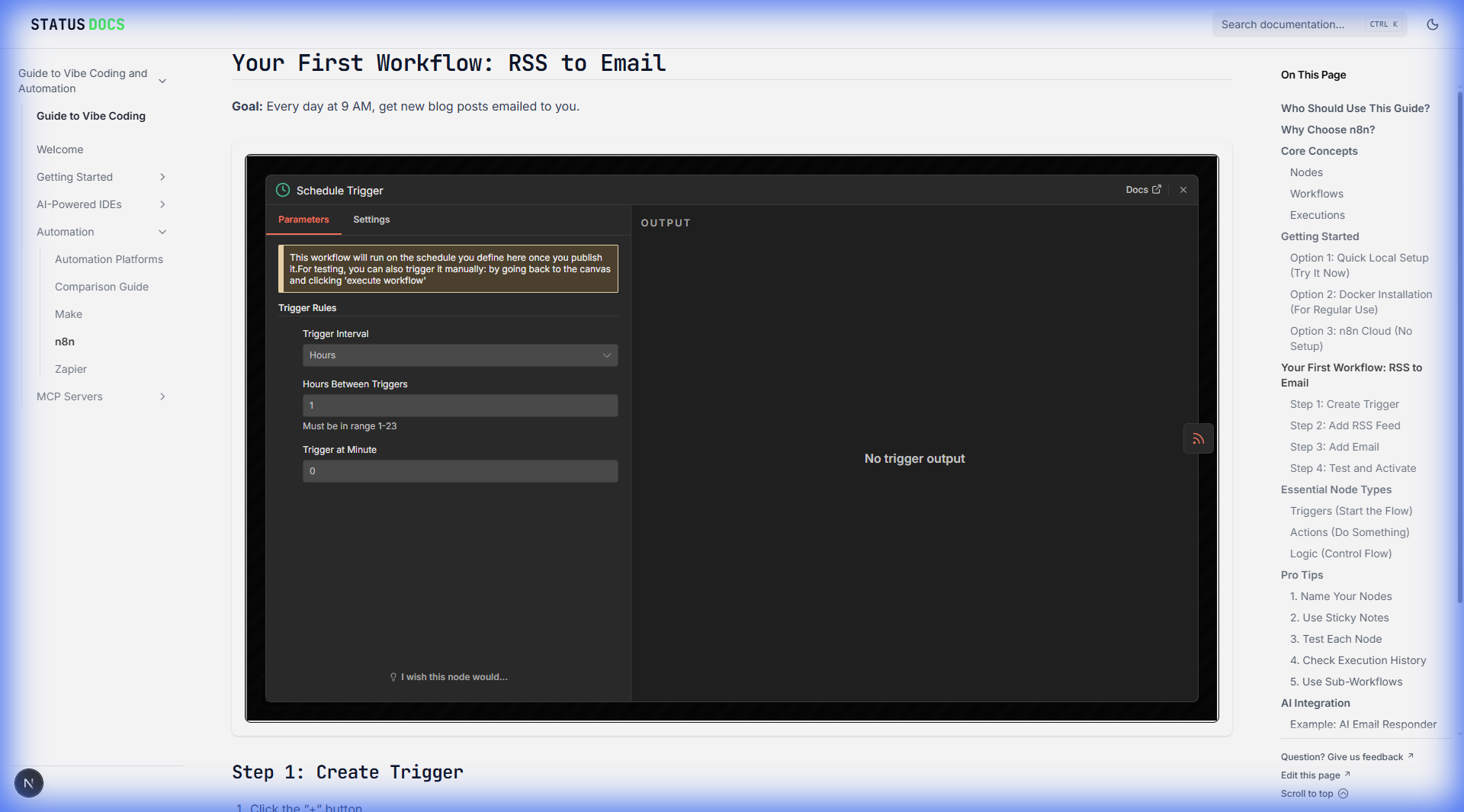
Step 1: Create Trigger
- Click the ”+” button
- Search for “Schedule Trigger”
- Set to run daily at 9 AM
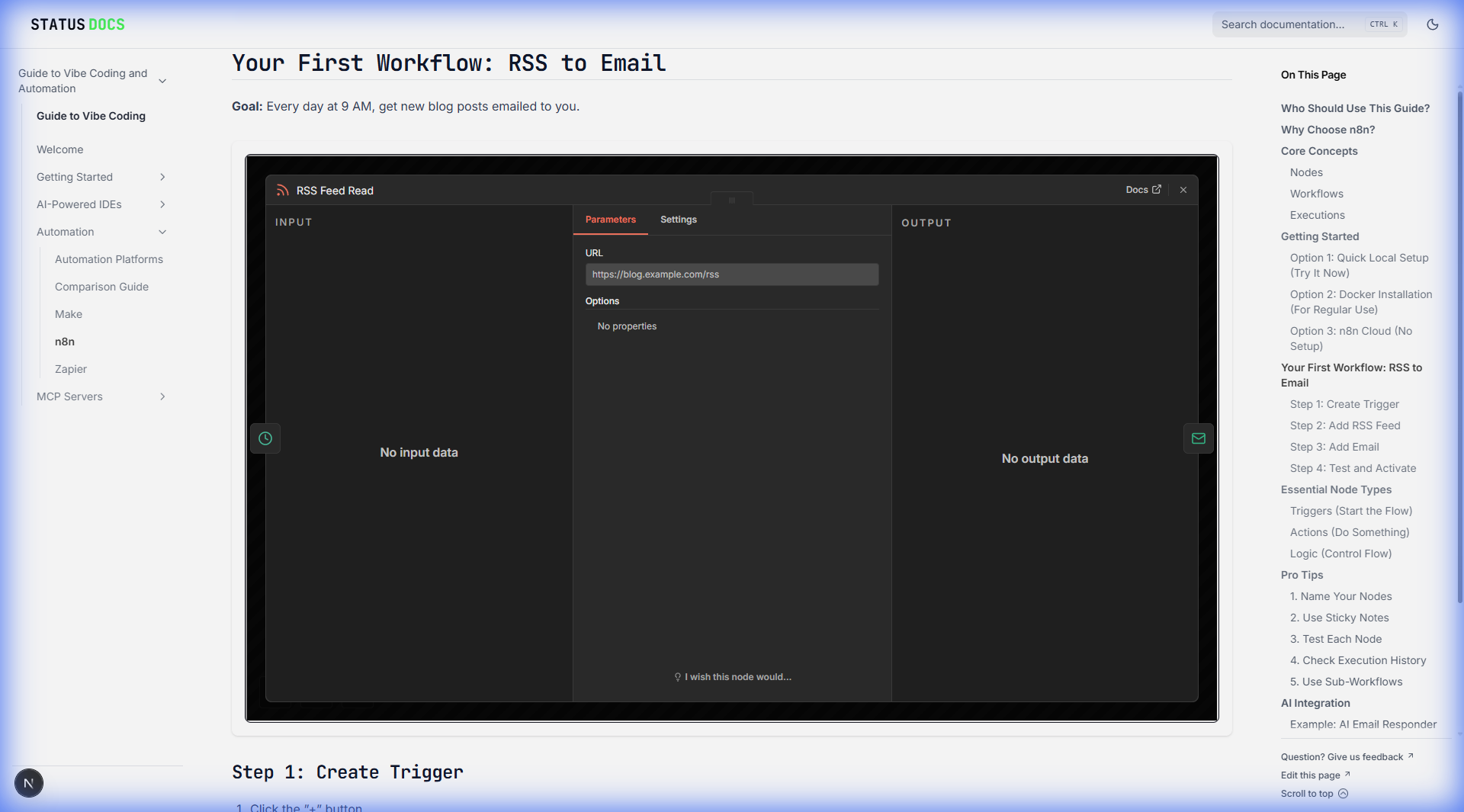
Step 2: Add RSS Feed
- Click ”+” again
- Search for “RSS Feed Read”
- Enter a blog’s RSS URL (e.g.,
https://blog.example.com/rss)
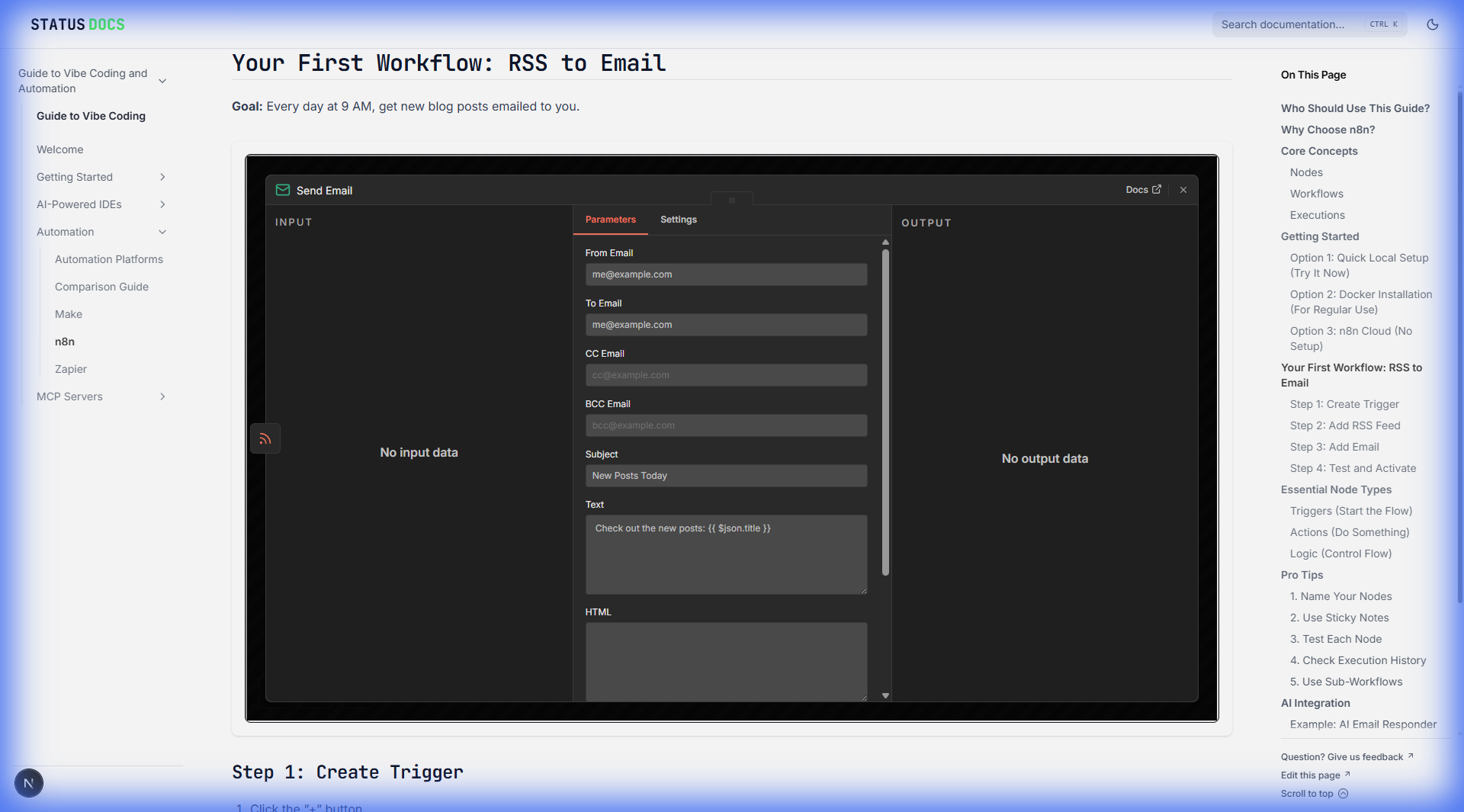
Step 3: Add Email
- Click ”+”
- Search for “Send Email” (or Gmail)
- Configure:
- To: Your email
- Subject: “New Posts Today”
- Body: Map the RSS title and link
Step 4: Test and Activate
- Click “Execute Workflow” to test
- Check your email
- Toggle the switch to activate
Essential Node Types
Triggers (Start the Flow)
| Node | When It Fires |
|---|---|
| Schedule | At set times (daily, hourly, etc.) |
| Webhook | When external service sends data |
| Form | When someone submits a form |
| When new email arrives |
Actions (Do Something)
| Node | What It Does |
|---|---|
| HTTP Request | Call any API |
| Gmail/Email | Send emails |
| Slack | Post messages |
| Google Sheets | Add/update rows |
| Database | Query/insert data |
Logic (Control Flow)
| Node | Purpose |
|---|---|
| IF | Branch based on condition |
| Switch | Multiple paths based on value |
| Filter | Only continue if criteria met |
| Merge | Combine data from multiple paths |
| Loop | Repeat for each item |
Pro Tips
1. Name Your Nodes
Rename nodes to describe what they do:
- ❌ “HTTP Request”
- ✅ “Fetch Weather Data”
2. Use Sticky Notes
Add notes to explain complex logic for future you.
3. Test Each Node
Click on a node → “Execute this node only” to test step by step.
4. Check Execution History
When things break, see exactly which step failed and why.
5. Use Sub-Workflows
For reusable logic, create separate workflows and call them.
AI Integration
n8n has native support for:
- OpenAI — GPT models, DALL-E
- Anthropic — Claude models
- Hugging Face — Open source models
- Stability AI — Image generation
Example: AI Email Responder
Email Trigger → OpenAI (classify intent) → Switch
                                           ├→ Support Question → Create Ticket
                                           ├→ Sales Inquiry → Add to CRM
                                           └→ Spam → Archive
Common Workflows
Lead Capture
Form submission → Add to CRM → Send welcome email → Notify sales
Content Distribution
New blog post → Post to Twitter → Post to LinkedIn → Send to subscribers
Daily Standup
Every morning → Fetch tasks from Asana → Summarize with AI → Send to Slack
Customer Onboarding
New user signup → Send welcome series → Create support ticket → Notify team
Pricing
| Plan | Price | Best For |
|---|---|---|
| Self-Hosted | Free | Technical teams with servers |
| Starter | $20/mo | Small teams getting started |
| Pro | $50/mo | Growing businesses |
| Enterprise | Custom | Large organizations |
Next Steps
→ Zapier Overview — Compare with the easier option
→ Comparison Guide — Full feature breakdown
→ MCP Servers — Connect AI to n8n